

Netskope NSK200 Dumps - The Sure Way To Pass Exam
NSK200 Exam Questions (Updated 2024) 100% Real Question Answers
NEW QUESTION # 15
Your company has Microsoft Azure ADFS set up as the Identity Provider (idP). You need to deploy the Netskope client to all company users on Windows laptops without user intervention.
In this scenario, which two deployment options would you use? (Choose two.)
- A. Deploy the Netskope client using an email Invitation.
- B. Deploy the Netskope client using IdP.
- C. Deploy the Netskope client with SCCM.
- D. Deploy the Netskope client with Microsoft GPO.
Answer: C,D
Explanation:
Explanation
To deploy the Netskope client to all company users on Windows laptops without user intervention, you can use either SCCM or GPO. These are two methods of packaging the application and pushing it silently to the user's device using Microsoft tools4. These methods donot require the user to have local admin privileges or to initiate the installation themselves. They also allow enforcing the use of the client through company policy. The Netskope client can authenticate the user using Azure ADFS as the identity provider, as long as the UPN of the logged in user matches the directory5
NEW QUESTION # 16
Your customer implements Netskope Secure Web Gateway to secure all Web traffic. While they have created policies to block certain categories, there are many new sites available dally that are not yet categorized. The customer's users need quick access and cannot wait to put in a request to gain access requiring a policy change or have the site's category changed.
To solve this problem, which Netskope feature would provide quick, safe access to these types of sites?
- A. Netskope Continuous Security Assessment (CSA)
- B. Netskope Remote Browser Isolation (RBI)
- C. Netskope Cloud Firewall (CFW)
- D. Netskope SaaS Security Posture Management (SSPM)
Answer: B
Explanation:
Explanation
To solve the problem of providing quick, safe access to uncategorized and risky websites, the Netskope feature that the customer should use is Netskope Remote Browser Isolation (RBI). Netskope RBI is a part of the Netskope Secure Web Gateway offering that intercepts a user's browsing session to a website, acting as a proxy that fetches the content for that user and renders the content in an isolated browsing instance. The rendered content is delivered to the user's browser as a safe stream of pixels. This safely silos the end user's device and the enterprise network and systems, separating it from their browsing activity and restricting the ability of an attacker to establish control and / or breach other systems and exfiltrate data1. Netskope RBI can be easily invoked with an 'isolate' policy action within the Netskope Security Cloud for any website category or domain2. Therefore, option B is correct and the other options are incorrect. References: Remote Browser Isolation - Netskope Knowledge Portal, Netskope Remote Browser Isolation - Netskope
NEW QUESTION # 17
You are comparing the behavior of Netskope's Real-time Protection policies to API Data Protection policies.
In this Instance, which statement is correct?
- A. All real-time policies are enforced, regardless of sequential order, while API policies are analyzed sequentially from top to bottom and stop once a policy Is matched.
- B. All API policies are enforced, regardless of sequential order, while real-time policies are analyzed sequentially from top to bottom and stop once a policy Is matched.
- C. Both real-time and API policies are analyzed sequentially from top to bottom and stop once a policy Is matched.
- D. Both real-time and API policies are all enforced, regardless of sequential order.
Answer: B
Explanation:
Explanation
Netskope's Real-time Protection policies and API Data Protection policies have different ways of applying actions based on the policy order. Real-time Protection policies are analyzed sequentially from top to bottom and stop once a policy is matched. This means that only one policy action is applied per transaction. API Data Protection policies are all enforced, regardless of sequential order. This means that multiple policy actions can be applied per file or email. Therefore, the correct statement is that all API policies are enforced, regardless of sequential order, while real-time policies are analyzed sequentially from top to bottom and stop once a policy is matched. References: Real-time Protection Policies1, API Data Protection Policies2
NEW QUESTION # 18
Review the exhibit.
You are troubleshooting a Netskope clientfor user Clarke which remains in a disabled state after being installed. After looking at various logs, you notice something which might explain the problem. The exhibit is an excerpt from the nsADImporterLog.log.
Referring to the exhibit, what is the problem?
- A. This is normal; it might take up to an hour to be enabled.
- B. The client traffic is decrypted by a network security device.
- C. The client was not Installed with administrative privileges.
- D. The Active Directory user is not synchronized to the Netskope tenant.
Answer: D
Explanation:
Explanation
The problem is B. The Active Directory user is not synchronized to the Netskope tenant. This is evident from the log message "WARNING No mail ID for the user: Clarke, Daxmeifield, DC=local, skipping use". This means that the user Clarke does not have a valid email address in the Active Directory, which is required for the Netskope client to work. The Netskope client uses the email address of the user to authenticate and enable the client. Therefore, option B is correct and the other options are incorrect.
NEW QUESTION # 19
You are using the Netskope DLP solution. You notice that valid credit card numbers in a file that you just uploaded to an unsanctioned cloud storage solution are not triggering a policy violation. You can see the Skope IT application events for this traffic but no DLP alerts.
Which statement is correct in this scenario?
- A. Netskope client is not enabled.
- B. Credit card numbers are entered with a space or dash separator and not as a 16-digit consecutive number.
- C. Netskope client is enabled, but API protection for the SaaS application is not configured.
- D. You have set the severity threshold to a higher value.
Answer: B
Explanation:
Explanation
The statement that is correct in this scenario is D. Credit card numbers are entered with a space or dash separator and not as a 16-digit consecutive number. This is one of the possible reasons why valid credit card numbers in a file are not triggering a policy violation by Netskope DLP. Netskope DLP uses data identifiers to detect sensitive data in files and network traffic. Data identifiers are predefined or custom rules that match data patterns based on regular expressions, checksums, keywords, etc1. The credit card number data identifier matches 16-digit consecutive numbers that pass the Luhn algorithm check2. If the credit card numbers are entered with a space or dash separator, such as 1234-5678-9012-3456 or 1234 5678 9012 3456, they will not match the data identifier and will not trigger a policy violation. To solve this problem, you can either remove the separators from the credit card numbers or create a custom data identifier that matches the credit card numbers with separators3. Therefore, option D is correct and the other options are incorrect. References: Data Identifiers - Netskope Knowledge Portal, Credit Card Number - Netskope Knowledge Portal, Create a Custom Data Identifier - Netskope Knowledge Portal
NEW QUESTION # 20
Your company needs to keep quarantined files that have been triggered by a DLP policy. In this scenario, which statement Is true?
- A. The files are stofed remotely In your data center assigned In the Quarantine profile.
- B. The files are stored In the Netskope data center assigned in the Quarantine profile.
- C. The files are stored on the administrator console PC assigned In the Quarantine profile.
- D. The files are stored In the Cloud provider assigned In the Quarantine profile.
Answer: B
Explanation:
Explanation
When a policy flags a file to be quarantined, that file is placed in a quarantine folder and a tombstone file is put in the original location in its place. The quarantine folder is located in the Netskope data center assigned in the Quarantine profile. The Quarantine profile is configured in Settings > Threat Protection > API-enabled Protection. The quarantined file is zipped and protected with a password to prevent users from inadvertently downloading the file. Netskope then notifies the admin specified in the profile1. Therefore, option B is correct and the other options are incorrect. References: Quarantine - Netskope Knowledge Portal, Threat Protection - Netskope Knowledge Portal
NEW QUESTION # 21
You are provisioning Netskope users from Okta with SCIM Provisioning, and users are not showing up in the tenant. In this scenario, which two Netskope components should you verify first In Okta for accuracy?
(Choose two.)
- A. OAuth token
- B. Netskope SAML certificate
- C. SCIM server URL
- D. IdP Entity ID
Answer: A,C
Explanation:
Explanation
To provision Netskope users from Okta with SCIM Provisioning, and users are not showing up in the tenant, the two Netskope components that you should verify first in Okta for accuracy are B. OAuth token and D.
SCIM server URL. The OAuth token is a credential that allows Okta to authenticate with the Netskope SCIM server and perform user provisioning operations4. The SCIM server URL is the endpoint that Okta uses to communicate with the Netskope SCIM server and send user data5. Both of these components must be configured correctly in Okta for the SCIM Provisioning to work. You can find them in the Netskope UI under Settings > Tools > Directory Tools > SCIM Integration6. Therefore, options B and D are correct and the other options are incorrect. References: SCIM-Based User Provisioning - Netskope Knowledge Portal, Netskope + Okta Use Case: Provisioning Users and Managing Groups Using SCIM - Netskope, Netskope Partner Okta - Netskope
NEW QUESTION # 22
You want to allow both the user identities and groups to be imported in the Netskope platform. Which two methods would satisfy this requirement? (Choose two.)
- A. Use Manual Entries.
- B. Use Directory Importer.
- C. Use Bulk Upload with a CSV file.
- D. Use System for Cross-domain Identity Management (SCIM).
Answer: C,D
Explanation:
Explanation
To allow both the user identities and groups to be imported in the Netskope platform, you can use either the System for Cross-domain Identity Management (SCIM) method or the Bulk Upload with a CSV file method.
Both of these methods allow for the import of user identities and groups from different identity providers (IdPs) that support SCIM or CSV formats. The SCIM method is recommended for large-scale deployments, as it automates the exchange of user identity information across apps for user provisioning. The CSV method is recommended for small-scale deployments, as it allows for manual upload of user details in a comma-separated values file. The other methods are not suitable for this requirement. The Manual Entries method does not allow for the import of groups, only user emails. The Directory Importer method does not import users and groups directly into the Netskope platform, but rather connects to an Active Directory or LDAP server and periodically fetches user and group information.
References: Provisioning Users for Netskope Client2, SCIM Integration3, Bulk Upload via CSV file
NEW QUESTION # 23
You are having issues with fetching user and group Information periodically from the domain controller and posting that information to your tenant instance in the Netskope cloud. To begin the troubleshooting process, what would you Investigate first in this situation?
- A. Directory Importer
- B. AD Connector
- C. On-Premises Log Parser
- D. DNS Connector
Answer: A
Explanation:
Explanation
The Directory Importer is a component of the Netskope Adapters that connects to the domain controller and periodically fetches user and group information to post that info to your tenant instance in the Netskope cloud1. If you are having issues with this process, the first thing you should investigate is the Directory Importer itself. You can check the status of the Directory Importer service, the configuration file, the logs, and the connectivity to the domain controller and the Netskope cloud2. Therefore, option B is correct and the other options are incorrect. References: Configure Directory Importer - Netskope Knowledge Portal, Troubleshooting Directory Importer - Netskope Knowledge Portal
NEW QUESTION # 24
Netskope support advised you to enable DTLS for belter performance. You added firewall rules to allow UDP port 443 traffic. These settings are part of which configuration element when enabled in the Netskope tenant?
- A. SSL decryption policies
- B. steering configuration
- C. client configuration
- D. Real-time Protection policies
Answer: C
Explanation:
Explanation
DTLS (Datagram Transport Layer Security) is a protocol that provides secure communication over UDP. It is an option that can be enabled in the client configuration settings in the Netskope tenant. Enabling DTLS can improve the performance of the Netskope client, especially in high latency or packet loss scenarios. DTLS is not related to Real-time Protection policies, SSL decryption policies, or steering configuration, which are different configuration elements in the Netskope tenant. References: Client Configuration Settings 3, Netskope Client Performance 4
NEW QUESTION # 25
Review the exhibit.
You are asked to restrict users from accessing YouTube content tagged as Sport. You created the required real-time policy; however, users can still access the content Referring to the exhibit, what is the problem?
- A. The policy changes have not been applied.
- B. The YouTube content cannot be controlled.
- C. The website is in a steering policy exception.
- D. The traffic matched a Do Not Decrypt policy
Answer: D
Explanation:
Explanation
The problem in this scenario is that the traffic matched a Do Not Decrypt policy. A Do Not Decrypt policy is a rule that specifies the traffic that you want to leave encrypted and not further analyzed by Netskope via the Real-time Protection policies1. In the exhibit, we can see that the traffic from the user to YouTube has a
"Bypass Traffic" value of "yes" and a "Netskope" value of "yes". This means that the traffic was steered to Netskope but not decrypted or inspected2. Therefore, the real-time policy that was created to restrict users from accessing YouTube content tagged as Sport did not apply, and users could still access the content. To solve this problem, you need to either remove or modify the Do Not Decrypt policy that matches the traffic to YouTube, or create an exception for the Sport category in the policy3. Therefore, option D is correct and the other options are incorrect. References: Page Events - Netskope Knowledge Portal, Add a Policy for SSL Decryption - Netskope Knowledge Portal, YouTube Content Control - Netskope Knowledge Portal
NEW QUESTION # 26
Review the exhibit.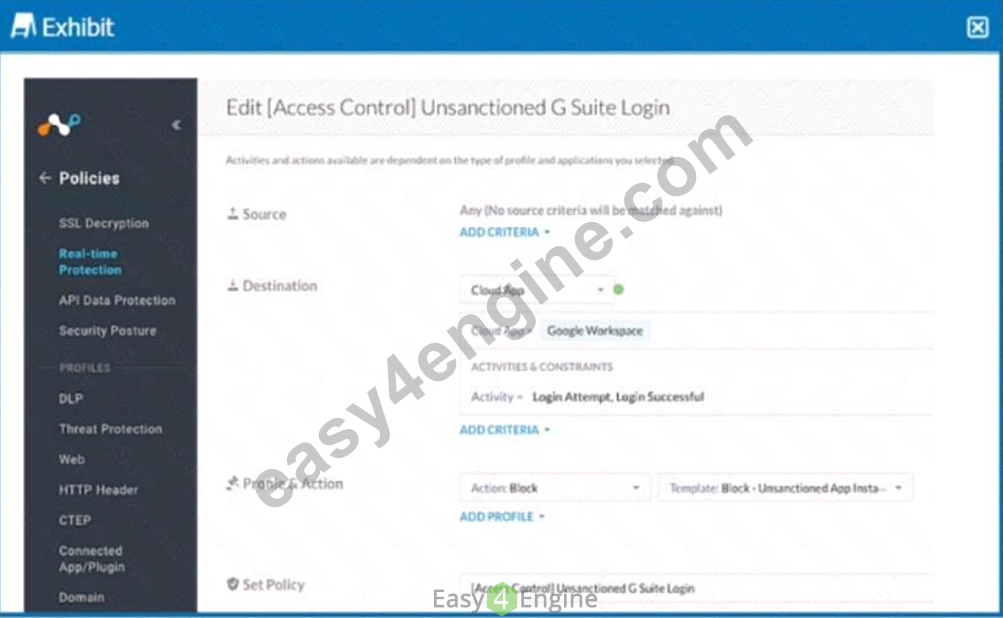
Your company uses Google as the corporate collaboration suite; however, corporate policy restricts the use of personal Google services. The exhibit provides a partially completed policy to ensure that users cannot log into their personal account.
What should be added to achieve the desired outcome in this scenario?
- A. DLP profile
- B. Device classification
- C. Google Gmail app
- D. User Constraint
Answer: D
Explanation:
Explanation
In order to restrict users from logging into their personal Google accounts, the policy should include a user constraint. This will ensure that only users with corporate accounts can access the corporate collaboration suite. The user constraint can be added by selecting the "User" option in the "Source" field and then choosing the appropriate user group or identity provider. The other options are not relevant for this scenario. References: [Creating a Policy to Block Personal Google Services], [Policy Creation], [User Constraint]
NEW QUESTION # 27
Review the exhibit.
While diagnosing an NPA connectivity issue, you notice an error message in the Netskope client logs.
Referring to the exhibit, what does this error represent?
- A. There Is an EDNS or LDNS resolution error.
- B. The Netskope client has been load-balanced to a different data center.
- C. There Is an upstream device trying to intercept the NPA TLS connection.
- D. The primary publisher is unavailable or cannot be reached.
Answer: C
Explanation:
Explanation
The error message in the exhibit represents that there is an upstream device trying to intercept the NPA TLS connection. The error message is "ERROR SSL certificate verification failed: self signed certificate in certificate chain". This means that the Netskope client is receiving a certificate that is not issued by Netskope, but by a device that is intercepting and decrypting the traffic between the client and the Netskope cloud. This can cause the client to fail to establish a secure connection to the NPA service and access the private applications4. To solve this problem, you need to either bypass or trust the upstream device that is performing SSL decryption, such as a firewall or proxy5. Therefore, option D is correct and the other options are incorrect. References: Troubleshooting Netskope Client - Netskope Knowledge Portal, Netskope Client Troubleshooting Guide - The Netskope Community
NEW QUESTION # 28
You are troubleshooting an issue with Microsoft where some users complain about an issue accessing OneDrive and SharePoint Online. The configuration has the Netskope client deployed and active for most users, but some Linux machines are routed to Netskope using GRE tunnels. You need to disable inspection for all users to begin troubleshooting the issue.
In this scenario, how would you accomplish this task?
- A. Create a Real-time Protection policy to isolate Microsoft 365.
- B. Create a steering exception for the Microsoft 365 domains.
- C. Create a Do Not Decrypt SSL policy for OneDrive.
- D. Create a Do Not Decrypt SSL policy for the Microsoft 365 App Suite.
Answer: D
Explanation:
Explanation
To disable inspection for all users accessing Microsoft 365, you need to create a Do Not Decrypt SSL policy for the Microsoft 365 App Suite. This policy will prevent Netskope from decrypting and analyzing the traffic for any Microsoft 365 app, regardless of the access method (Netskope client or GRE tunnel)3. This policy will also allow SNI-based policies to apply, but no deep analysis performed via Real-time Protection policies4.
Therefore, option B is correct and the other options are incorrect. References: Add a Policy for SSL Decryption - Netskope Knowledge Portal, Default Microsoft appsuite SSL do not decrypt rule - Netskope Community
NEW QUESTION # 29
Your company asks you to use Netskope to integrate with Endpoint Detection and Response (EDR) vendors suchas CrowdStrike. In this scenario,what is a requirement for a successful Integration and sharing of threat data?
- A. device classification
- B. user endpoint
- C. custom log parser
- D. API Client ID
Answer: D
Explanation:
Explanation
To integrate Netskope with EDR vendors such as CrowdStrike and share threat data, a requirement for a successful integration is A. API Client ID. An API Client ID is a unique identifier that is used to authenticate and authorize requests to the EDR vendor's API. You need to obtain an API Client ID from the EDR vendor and enter it in the Netskope tenant settings under Threat Protection > Integration. This will allow Netskope to communicate with the EDR vendor and exchange threat intelligence and remediation actions1. Therefore, option A is correct and the other options are incorrect. References: Integrating CrowdStrike for EDR - Netskope Knowledge Portal
NEW QUESTION # 30
......
Pass Netskope NSK200 Exam Quickly With Easy4Engine: https://www.easy4engine.com/NSK200-test-engine.html
Prepare NSK200 Question Answers - NSK200 Exam Dumps: https://drive.google.com/open?id=1lpzmxTnuDcnqfZ5FrWQ33slxErfjh6AN
