

Professional-Cloud-Network-Engineer Free Update With 100% Exam Passing Guarantee [2026]
[May-2026] Verified Google Exam Dumps with Professional-Cloud-Network-Engineer Exam Study Guide
Google Cloud Certified - Professional Cloud Network Engineer is a certification exam for individuals who are interested in advancing their career in cloud networking. Google Cloud Certified - Professional Cloud Network Engineer certification is specifically designed for those who have experience in designing, implementing, and managing networks on the Google Cloud Platform. Professional-Cloud-Network-Engineer exam is intended to validate the skills and knowledge required to build and manage a secure and efficient network infrastructure on Google Cloud.
NEW QUESTION # 24
You have an application that is running in a managed instance group. Your development team has released an updated instance template which contains a new feature which was not heavily tested. You want to minimize impact to users if there is a bug in the new template.
How should you update your instances?
- A. Deploy a new instance group and canary the updated template in that group. Verify the new feature in the new canary instance group, and then update the original instance group.
- B. Perform a canary update by starting a rolling update and specifying a target size for your instances to receive the new template. Verify the new feature on the canary instances, and then roll forward to the rest of the instances.
- C. Manually patch some of the instances, and then perform a rolling restart on the instance group.
- D. Using the new instance template, perform a rolling update across all instances in the instance group.
Verify the new feature once the rollout completes.
Answer: B
Explanation:
https://cloud.google.com/compute/docs/instance-groups/rolling-out-updates-to-managed-instance- groups#starting_a_canary_update
https://cloud.google.com/compute/docs/instance-groups/rolling-out-updates-to-managed-instance-groups
NEW QUESTION # 25
You have configured a Compute Engine virtual machine instance as a NAT gateway. You execute the following command:
gcloud compute routes create no-ip-internet-route \
--network custom-network1 \
--destination-range 0.0.0.0/0 \
--next-hop instance nat-gateway \
--next-hop instance-zone us-central1-a \
--tags no-ip --priority 800
You want existing instances to use the new NAT gateway. Which command should you execute?
- A. gcloud builds submit --config=cloudbuild.waml --substitutions=TAG_NAME=no-ip
- B. gcloud compute instances create example-instance --network custom-network1 \
--subnet subnet-us-central \
--no-address \
--zone us-central1-a \
--image-family debian-9 \
--image-project debian-cloud \
--tags no-ip - C. gcloud compute instances add-tags [existing-instance] --tags no-ip
- D. sudo sysctl -w net.ipv4.ip_forward=1
Answer: B
Explanation:
Reference:
https://cloud.google.com/vpc/docs/special-configurations
NEW QUESTION # 26
You are migrating to Cloud DNS and want to import your BIND zone file.
Which command should you use?
- A. gcloud dns record-sets import ZONE_FILE --delete-all-existing --zone MANAGED ZONE
- B. gcloud dns record-sets import ZONE_FILE --zone MANAGED_ZONE
- C. gcloud dns record-sets import ZONE_FILE --replace-origin-ns --zone MANAGED_ZONE
- D. gcloud dns record-sets import ZONE_FILE --zone-file-format --zone MANAGED_ZONE
Answer: D
Explanation:
https://cloud.google.com/sdk/gcloud/reference/dns/record-sets/import
NEW QUESTION # 27
Your company has 10 separate Virtual Private Cloud (VPC) networks, with one VPC per project in a single region in Google Cloud. Your security team requires each VPC network to have private connectivity to the main on-premises location via a Partner Interconnect connection in the same region. To optimize cost and operations, the same connectivity must be shared with all projects. You must ensure that all traffic between different projects, on-premises locations, and the internet can be inspected using the same third-party appliances. What should you do?
- A. Configure the third-party appliances with multiple interfaces and specific Partner Interconnect VLAN attachments per project. Create the relevant routes on the third-party appliances and VPC networks.
- B. Consolidate all existing projects' subnetworks into a single VPC. Create separate VPC networks for on- premises and internet connectivity. Configure the third-party appliances with multiple interfaces, with each interface connected to a separate VPC network. Create the relevant routes on the third-party appliances and VPC networks.
- C. Configure the third-party appliances with multiple interfaces, with each interface connected to a separate VPC network. Create separate VPC networks for on- premises and internet connectivity.
Create the relevant routes on the third-party appliances and VPC networks. - D. Configure the third-party appliances with multiple interfaces. Create a hub VPC network for all projects, and create separate VPC networks for on-premises and internet connectivity. Create the relevant routes on the third-party appliances and VPC networks. Use VPC Network Peering to connect all projects' VPC networks to the hub VPC. Export custom routes from the hub VPC and import on all projects' VPC networks.
Answer: D
NEW QUESTION # 28
You need to enable Cloud CDN for all the objects inside a storage bucket. You want to ensure that all the object in the storage bucket can be served by the CDN.
What should you do in the GCP Console?
- A. Create a new TCP load balancer, select the storage bucket as a backend, and then enable Cloud CDN on the backend.
- B. Create a new cloud storage bucket, and then enable Cloud CDN on it.
- C. Create a new SSL proxy load balancer, select the storage bucket as a backend, and then enable Cloud CDN on the backend.
- D. Create a new HTTP load balancer, select the storage bucket as a backend, enable Cloud CDN on the backend, and make sure each object inside the storage bucket is shared publicly.
Answer: D
Explanation:
https://cloud.google.com/load-balancing/docs/https/adding-backend-buckets-to-load- balancers#using_cloud_cdn_with_cloud_storage_buckets Cloud CDN needs HTTP(S) Load Balancers and Cloud Storage bucket has to be shared publicly. https://cloud.
google.com/cdn/docs/setting-up-cdn-with-bucket
NEW QUESTION # 29
Your organization has a new security policy that requires you to monitor all egress traffic payloads from your virtual machines in region us-west2. You deployed an intrusion detection system (IDS) virtual appliance in the same region to meet the new policy. You now need to integrate the IDS into the environment to monitor all egress traffic payloads from us-west2. What should you do?
- A. Enable VPC Flow Logs. Create a sink in Cloud Logging to send filtered egress VPC Flow Logs to the IDS.
- B. Enable firewall logging, and forward all filtered egress firewall logs to the IDS.
- C. Create an internal TCP/UDP load balancer for Packet Mirroring, and add a packet mirroring policy filter for egress traffic.
- D. Create an internal HTTP(S) load balancer for Packet Mirroring, and add a packet mirroring policy filter for egress traffic.
Answer: A
NEW QUESTION # 30
You are designing a Partner Interconnect hybrid cloud connectivity solution with geo-redundancy across two metropolitan areas. You want to follow Google-recommended practices to set up the following region/metro pairs:
(region 1/metro 1)
(region 2/metro 2)
What should you do?
- A. Create a Cloud Router in region 1 with one VLAN attachment connected to metro1-zone2-x.
Create a Cloud Router in region 2 with one VLAN attachment connected to metro2-zone2-x. - B. Create a Cloud Router in region 1 with one VLAN attachment connected to metro1-zone1-x and one VLAN attachment connected to metro1-zone2-x.Create a Cloud Router in region 2 with one VLAN attachment connected to metro2-zone1-x and one VLAN attachment to metro2-zone2-x.
- C. Create a Cloud Router in region 1 with two VLAN attachments connected to metro1-zone1-x.
Create a Cloud Router in region 2 with two VLAN attachments connected to metro1-zone2-x. - D. Create a Cloud Router in region 1 with one VLAN attachment connected to metro1-zone1-x.
Create a Cloud Router in region 2 with two VLAN attachments connected to metro2-zone2-x.
Answer: D
NEW QUESTION # 31
You are a network administrator at your company planning a migration to Google Cloud and you need to finish the migration as quickly as possible, To ease the transition, you decided to use the same architecture as your on-premises network' a hub-and-spoke model. Your on-premises architecture consists of over 50 spokes. Each spoke does not have connectivity to the other spokes, and all traffic IS sent through the hub for security reasons. You need to ensure that the Google Cloud architecture matches your on-premises architecture. You want to implement a solution that minimizes management overhead and cost, and uses default networking quotas and limits. What should you do?
- A. Connect all the spokes to the hub With Cloud VPN. Use a third-party network appliance as a default gateway to prevent connectivity between the spokes
- B. Connect all the spokes to the hub with VPC Network Peering.
- C. Connect all the spokes to the hub with Cloud VPN.
- D. Connect all the spokes to the hub with VPC Network Peering. Use a third-party network appliance as a default gateway to prevent connectivity between the spokes.
Answer: D
Explanation:
The correct answer is D because it meets the following requirements:
It matches the hub-and-spoke model of the on-premises network, where each spoke is a separate VPC network that is connected to a central hub VPC network.
It minimizes management overhead and cost, because VPC Network Peering is a simple and low-cost way to connect VPC networks without using any external IP addresses or VPN gateways1.
It uses default networking quotas and limits, because VPC Network Peering does not consume any quota or limit for VPN tunnels, external IP addresses, or forwarding rules2.
It prevents connectivity between the spokes, because VPC Network Peering is non-transitive by default, meaning that a spoke can only communicate with the hub, not with other spokes1. To enforce this restriction, a third-party network appliance can be used as a default gateway in each spoke VPC network, which can filter out any traffic destined for other spokes3.
Option A is incorrect because it does not minimize cost, as Cloud VPN charges for egress traffic and requires external IP addresses for the VPN gateways4. Option B is incorrect because it does not prevent connectivity between the spokes, as VPC Network Peering allows direct communication between peered VPC networks by default1. Option C is incorrect because it does not minimize cost or use default quotas and limits, for the same reasons as option A.
Reference:
VPC Network Peering overview | VPC
Quotas and limits | VPC
Hub-and-spoke network architecture | Cloud Architecture Center
Cloud VPN overview | Google Cloud
NEW QUESTION # 32
You have several VMs across multiple VPCs in your cloud environment that require access to internet endpoints. These VMs cannot have public IP addresses due to security policies, so you plan to use Cloud NAT to provide outbound internet access. Within your VPCs, you have several subnets in each region. You want to ensure that only specific subnets have access to the internet through Cloud NAT. You want to avoid any unintentional configuration issues caused by other administrators and align to Google-recommended practices. What should you do?
- A. Create a firewall rule in each VPC at priority 500 that targets all instances in the network and denies egress to the internet (0.0.0.0/0). Create a firewall rule at priority 300 that targets all instances in the network, has a source filter that maps to the allowed subnets, and allows egress to the internet (0.0.0.0
/0). Deploy Cloud NAT and configure all primary and secondary subnet source ranges. - B. Create a constraints/compute.restrictCloudNATUsage organizational policy constraint. Attach the constraint to a folder that contains the associated projects. Configure the allowedValues to only contain the subnets that should have internet access. Deploy Cloud NAT and select only the allowed subnets.
- C. Create a firewall rule in each VPC at priority 500 that targets all instances in the network and denies egress to the internet (0.0.0.0/0). Create a firewall rule at priority 300 that targets all instances in the network, has a source filter that maps to the allowed subnets, and allows egress to the internet (0.0.0.0
/0). Deploy Cloud NAT and configure a custom source range that includes the allowed subnets. - D. Deploy Cloud NAT in each VPC and configure a custom source range that includes the allowed subnets. Configure Cloud NAT rules to only permit the allowed subnets to egress through Cloud NAT.
Answer: B
Explanation:
Explanation: Using an organizational policy with the restrictCloudNATUsage constraint allows you to limit Cloud NAT usage to specific subnets, ensuring that only the necessary subnets can access the internet. This method aligns with Google-recommended practices for controlling Cloud NAT configurations across multiple VPCs and regions.
NEW QUESTION # 33
You have the following routing design. You discover that Compute Engine instances in Subnet-2 in the asia-southeast1 region cannot communicate with compute resources on-premises. What should you do?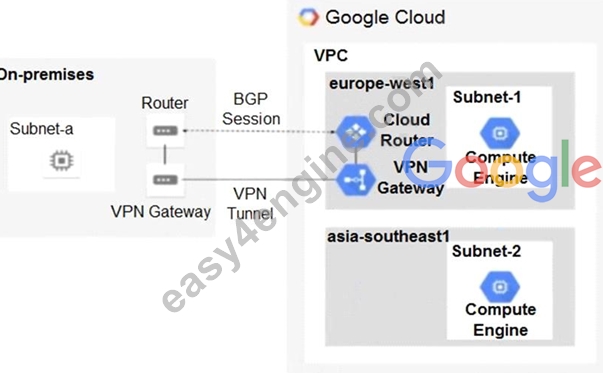
- A. Configure a custom route advertisement on the Cloud Router.
- B. Add a second Border Gateway Protocol (BGP) session to the Cloud Router.
- C. Change the VPC dynamic routing mode to Global.
- D. Enable IP forwarding in the asia-southeast1 region.
Answer: C
NEW QUESTION # 34
You have the networking configuration shown in the diagram. A pair of redundant Dedicated Interconnect connections (int-Igal and int-Iga2) terminate on the same Cloud Router The Interconnect connections terminate on two separate on-premises routers. You are advertising the same prefixes from the Border Gateway Protocol (BGP) sessions associated with the Dedicated Interconnect connections. You need to configure one connection as Active for both ingress and egress traffic. If the active Interconnect connection fails, you want the passive Interconnect connection to automatically begin routing all traffic Which two actions should you take to meet this requirement? (Choose Two)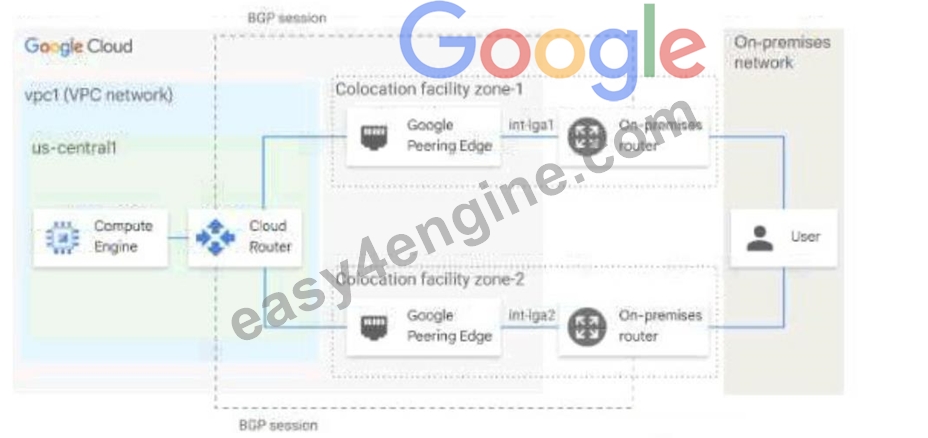
- A. Configure the advertised route priority as 200 for the BGP session associated With the passive Interconnect connection.
- B. Advertise a lower MED on the passive Interconnect connection from the on-premises router
- C. Configure the advertised route priority as 200 for the BGP session associated Wlth the active Interconnect connection.
- D. Configure the advertised route priority > 10,200 on the active Interconnect connection.
- E. Advertise a lower MED on the active Interconnect connection from the on-premises router
Answer: C,E
Explanation:
This answer meets the requirement of configuring one connection as Active for both ingress and egress traffic, and enabling automatic failover to the passive connection in case of failure. The reason is:
The advertised route priority is a value that Cloud Router uses to set the route priority when advertising routes to your on-premises router. The lower the value, the higher the priority1. By setting the advertised route priority as 200 for the active connection, you ensure that it has a higher priority than the passive connection, which has the default value of 1001. This way, your on-premises router will prefer the routes from the active connection over the passive one for ingress traffic.
The MED (Multi-Exit Discriminator) is a value that your on-premises router uses to indicate its preference for receiving traffic from Cloud Router. The lower the value, the higher the preference2. By advertising a lower MED on the active connection from your on-premises router, you ensure that Cloud Router will prefer sending traffic to the active connection over the passive one for egress traffic.
If the active connection fails, Cloud Router will stop receiving routes from it and will start using the routes from the passive connection for egress traffic. Similarly, your on-premises router will stop receiving routes with priority 200 from the active connection and will start using the routes with priority 100 from the passive connection for ingress traffic. This achieves automatic failover without any manual intervention.
Option A is incorrect because setting the advertised route priority > 10,200 on the active connection would deprioritize it globally in your VPC network, which is not what you want1. Option B is incorrect because advertising a lower MED on the passive connection would make Cloud Router prefer sending traffic to it over the active one, which is not what you want2. Option D is incorrect because setting the advertised route priority as 200 for both connections would make them equally preferred by your on-premises router, which is not what you want1.
Reference:
Update the base route priority | Cloud Router | Google Cloud
Configuring BGP sessions | Cloud Router | Google Cloud
NEW QUESTION # 35
Your organization has resources in two different VPCs, each in different Google Cloud projects, and requires connectivity between the resources in the two VPCs. You have already determined that there is no IP address overlap; however, one VPC uses privately used public IP (PUPI) ranges. You would like to enable connectivity between these resources by using a lower cost and higher performance method. What should you do?
- A. Create a VPC Network Peering connection between the two VPCs that allows the export and import of subnet routes with public IP addresses. Create the necessary ingress VPC firewall rules that target the specific resources by using network tags as the source filter.
- B. Create a VPC Network Peering connection between the two VPCs that allows the export and import of subnet routes with public IP addresses. Create the necessary ingress VPC firewall rules that target the specific resources by using IP ranges as the source filter.
- C. Create a VPC Network Peering connection between the two VPCs that allows the export and import of custom routes for public IP addresses. Create the necessary ingress VPC firewall rules that target the specific resources by using service accounts as the source filter.
- D. Create an HA VPN between the two VPCs that includes the PUPI ranges in the custom route advertisements of the Cloud Router. Create the necessary ingress VPC firewall rules that target the specific resources by using IP ranges as the source filter.
Answer: B
Explanation:
Explanation: VPC Network Peering is the most cost-effective and high-performance method for connecting two VPCs. Since one VPC uses privately used public IP (PUPI) ranges, you need to configure peering to allow the export and import of subnet routes with public IP addresses. Firewall rules can be used to control traffic between the resources.
NEW QUESTION # 36
Your organization recently exposed a set of services through a global external Application Load Balancer.
After conducting some testing, you observed that responses would intermittently yield a non-HTTP 200 response. You need to identify the error. What should you do? (Choose 2 answers)
- A. Validate the health of the backend service. Enable logging for the backend service and identify the error response in Cloud Logging. Determine the cause of the error by reviewing the statusDetails log field.
- B. Access a VM in the VPC through SSH and try to access a backend VM directly. If the request is successful from the VM, increase the quantity of backends.
- C. Enable and review the health check logs. Review the error responses in Cloud Logging.
- D. Validate the health of the backend service. Enable logging on the load balancer and identify the error response in Cloud Logging. Determine the cause of the error by reviewing the statusDetails log field.
- E. Delete the load balancer and backend services. Create a new passthrough Network Load Balancer.
Configure a failover group of VMs for the backend.
Answer: C,D
Explanation:
Explanation: To troubleshoot the intermittent non-HTTP 200 responses, you should enable and review health check logs and log the backend service's responses in Cloud Logging. Reviewing the statusDetails field helps identify the cause of the error. Enabling logging on the load balancer and backend service provides visibility into the issue.
NEW QUESTION # 37
All the instances in your project are configured with the custom metadata enable-oslogin value set to FALSE and to block project-wide SSH keys. None of the instances are set with any SSH key, and no project-wide SSH keys have been configured. Firewall rules are set up to allow SSH sessions from any IP address range. You want to SSH into one instance.
What should you do?
- A. Set the custom metadata enable-oslogin to TRUE, and SSH into the instance using a third-party tool like putty or ssh.
- B. Open the Cloud Shell SSH into the instance using gcloud compute ssh.
- C. Generate a new SSH key pair. Verify the format of the private key and add it to the instance.
SSH into the instance using a third-party tool like putty or ssh. - D. Generate a new SSH key pair. Verify the format of the public key and add it to the project.
SSH into the instance using a third-party tool like putty or ssh.
Answer: A
Explanation:
https://cloud.google.com/compute/docs/storing-retrieving-metadata
NEW QUESTION # 38
Question:
Your organization has a hub and spoke architecture with VPC Network Peering, and hybrid connectivity is centralized at the hub. The Cloud Router in the hub VPC is advertising subnet routes, but the on-premises router does not appear to be receiving any subnet routes from the VPC spokes. You need to resolve this issue.
What should you do?
- A. Create custom routes at the Cloud Router in the hub to advertise the subnets of the VPC spokes.
- B. Create custom routes at the Cloud Router in the spokes to advertise the subnets of the VPC spokes.
- C. Create custom learned routes at the Cloud Router in the hub to advertise the subnets of the VPC spokes.
- D. Create a BGP route policy at the Cloud Router, and ensure the subnets of the VPC spokes are being announced towards the on-premises environment.
Answer: C
Explanation:
Creating custom learned routes at the hub's Cloud Router is required for advertising VPC spokes' subnets to the on-premises environment. This centralizes route configuration and ensures that all spoke subnet routes are propagated to the hybrid network.
Reference: Google Cloud - Cloud Router Custom Routes
NEW QUESTION # 39
You have setup a shared VPC and you have created three projects; Host Project, Service Project-1 and Service Project-2. You have created two subnets, subnet-1 in us-west1 and subnet-
2 in us-central1 in the Host Project. Only subnet-1 has been shared with Service Project -1 but when you go to VPC networks in Service Project-1 you also see subnet-2 which hasn't been shared with Service Project-1. Please select the correct option from below why is subnet-2 available to Service Project-1. Note Host Project is the Host Project in the shared VPC, Service Project-1 and Service project-2 are the Service Projects in the shared VPC.
- A. By default all subnets are available.
- B. It is a bug in Google Cloud, please report it.
- C. The current user has Shared VPC Admin role and with Shared VPC Admin role all the networks are available.
- D. Remove Shared Network admin role to the current user.
Answer: C
Explanation:
Option A is the Correct choice because , if the current user has Shared VPC Admin role then all the networks in the shared VPC is the available to the user irrespective of subnet level sharing permission with the Service Projects.
Option B is Incorrect because , it is not a bug .
Option C is Incorrect because ,all the subnets would be available if the current user has Shared Admin role.
Option D is Incorrect because ,Shared Network Admin role doesn't exist.
NEW QUESTION # 40
Your company's logo is published as an image file across multiple websites that are hosted by your company You have implemented Cloud CDN, however, you want to improve the performance of the cache hit ratio associated with this image file. What should you do?
- A. Configure the default time to live (TTL) as O for the image file.
- B. Configure versioned IJRLs for each domain to serve users the *mage file before the cache entry expires
- C. Configure Cloud Storage as a custom origin backend to host the image file, and select multi-region as the location type
- D. Configure custom cache keys for the backend service that holds the image file, and clear the Host and Protocol checkboxes-
Answer: D
Explanation:
This answer meets the requirement of improving the performance of the cache hit ratio associated with the image file. The reason is:
* Custom cache keys allow you to control which parts of the request URL are used to build the cache key. The cache key is a unique identifier that Cloud CDN uses to store and retrieve cached content1.
* By default, Cloud CDN uses the complete request URL, including the protocol (http or https) and the host (the domain name), to build the cache key. This means that if the same image file is requested from different domains or protocols, Cloud CDN will cache multiple copies of it, which reduces the cache hit ratio1.
* By clearing the Host and Protocol checkboxes, you can tell Cloud CDN to ignore these parts of the request URL when building the cache key. This way, Cloud CDN will cache only one copy of the image file, regardless of which domain or protocol it is requested from, which improves the cache hit ratio1.
Option B is incorrect because configuring Cloud Storage as a custom origin backend does not affect the cache hit ratio. It only affects how Cloud CDN retrieves the content from the origin if it is not cached. Option C is incorrect because configuring versioned URLs for each domain does not improve the cache hit ratio. It actually worsens it, because it creates more variations of the request URL that Cloud CDN has to cache separately. Option D is incorrect because configuring the default TTL as 0 for the image file means that Cloud CDN will not cache it at all, which defeats the purpose of using Cloud CDN.
NEW QUESTION # 41
Your organization has distributed geographic applications with significant data volumes. You need to create a design that exposes the HTTPS workloads globally and keeps traffic costs to a minimum. What should you do?
- A. Deploy a global external proxy Network Load Balancer with Standard Network Service Tier.
- B. Deploy a regional external Application Load Balancer with Premium Network Service Tier.
- C. Deploy a regional external Application Load Balancer with Standard Network Service Tier.
- D. Deploy a global external Application Load Balancer with Premium Network Service Tier.
Answer: D
Explanation:
The global external Application Load Balancer with Premium Network Service Tier provides optimized routing and lower latency for HTTPS workloads on a global scale. Premium tier minimizes costs by avoiding multiple regional configurations while ensuring reliable performance for global users.
NEW QUESTION # 42
You have recently been put in charge of managing identity and access management for your organization. You have several projects and want to use scripting and automation wherever possible. You want to grant the editor role to a project member.
Which two methods can you use to accomplish this? (Choose two.)
GetIamPolicy() via REST API
- A. role roles/editor
gcloud projects add-iam-policy-binding $projectname --member user:$username -- - B. gcloud pubsub add-iam-policy-binding $projectname --member user:$username --
- C. Enter an email address in the Add members field, and select the desired role from the drop-down menu in the GCP Console.
- D. role roles/editor
- E. setIamPolicy() via REST API
Answer: C,D
Explanation:
Explanation/Reference: https://cloud.google.com/iam/docs/granting-changing-revoking-access
NEW QUESTION # 43
You have the networking configuration shown. In the diagram Two VLAN attachments associated With two Dedicated Interconnect connections terminate on the same Cloud Router (mycloudrouter). The Interconnect connections terminate on two separate on-premises routers. You advertise the same prefixes from the Border Gateway Protocol (BOP) sessions associated with each Of the VLAN attachments.
You notice an asymmetric traffic flow between the two Interconnect connections. Which of the following actions should you take to troubleshoot the asymmetric traffic flow?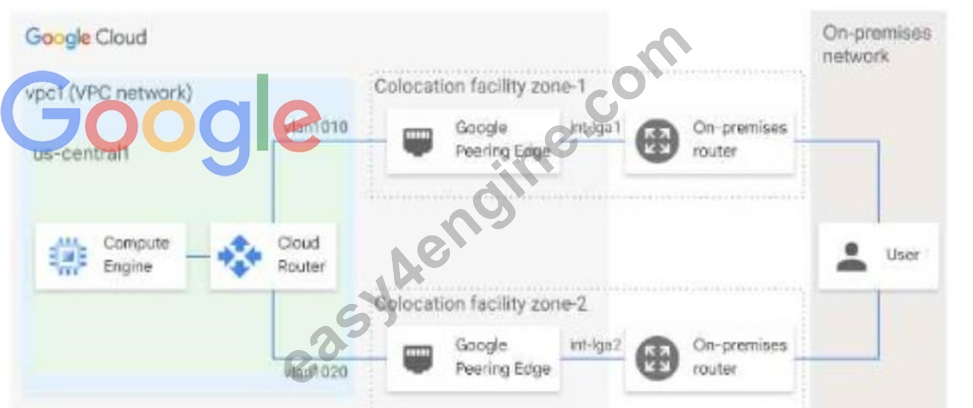
- A. From the Google Cloud console, navigate to the Hybrid Connectivity select the Cloud Router, and view BGP sessions.
- B. From the Cloud CLI. run gcloud compute routers describe mycloudrouter
- C. From the Cloud CLI, run gcloud compute -protect_ID router get-status mycloudrouter --region REGION and review the results.
- D. From the Google Cloud console, navigate to Cloud Logging to view VPC Flow Logs and review the results
Answer: A
Explanation:
--region REGION and review the results
Explanation:
The correct answer is B. From the Cloud CLI, run gcloud compute --project_ID router get-status mycloudrouter --region REGION and review the results.
This command will show you the BGP session status, the advertised and learned routes, and the last error for each VLAN attachment. You can use this information to troubleshoot the asymmetric traffic flow and identify any issues with the BGP configuration or the Interconnect connections.
The other options are not correct because:
Option A will only show you the BGP session status, but not the advertised and learned routes or the last error for each VLAN attachment.
Option C will only show you the VPC Flow Logs, which are useful for monitoring and troubleshooting network performance and security issues within your VPC network, but not for your Interconnect connections.
Option D will only show you the basic information about the Cloud Router, such as its name, region, network, and BGP settings, but not the detailed status of each VLAN attachment.
NEW QUESTION # 44
(You need to migrate multiple PostgreSQL databases from your on-premises data center to Google Cloud.
You want to significantly improve the performance of your databases while minimizing changes to your data schema and application code. You expect to exceed 150 TB of data per geographical region. You want to follow Google-recommended practices and minimize your operational costs. What should you do?)
- A. Migrate your data to Firebase.
- B. Migrate your data to Bigtable.
- C. Migrate your data to AlloyDB.
- D. Migrate your data to Spanner.
Answer: A,B,C
Explanation:
Let's analyze each option based on the requirements: PostgreSQL compatibility, significant performance improvement, minimal schema/code changes, handling large data volumes, Google-recommended practices, and cost minimization:
A: Migrate your data to AlloyDB: AlloyDB for PostgreSQL is a fully managed, PostgreSQL-compatible database service that offers significant performance improvements over standard PostgreSQL due to its architectural optimizations. It is designed to handle large data volumes and minimizes the need for schema and application code changes as it's wire-compatible with PostgreSQL. This aligns well with the requirements for performance improvement, minimal changes, large data, and being a Google-recommended option for PostgreSQL workloads.
B: Migrate your data to Spanner: Spanner is a globally distributed, horizontally scalable database with strong consistency. While it offers excellent scalability and performance, it's not directly PostgreSQL-compatible.
Migrating to Spanner would likely require significant schema and application code changes due to differences in data modeling and SQL dialect.
C: Migrate your data to Firebase: Firebase is a suite of mobile and web development tools, with its primary database offering being Firestore (a NoSQL document database) and Realtime Database. These are not PostgreSQL-compatible and would require substantial changes to the data model and application code.
D: Migrate your data to Bigtable: Bigtable is a highly scalable NoSQL wide-column store. It's not compatible with PostgreSQL and requires a completely different data model and application logic.
Therefore, AlloyDB is the most suitable option as it provides PostgreSQL compatibility for minimal migration effort, significant performance improvements, scalability for large data volumes, and is a recommended Google Cloud database service for PostgreSQL workloads.
Google Cloud Documentation References:
AlloyDB for PostgreSQL Overview: https://cloud.google.com/alloydb/docs/overview - This document highlights AlloyDB's PostgreSQL compatibility, performance benefits, scalability, and suitability for migrating existing PostgreSQL workloads.
Spanner Overview: https://cloud.google.com/spanner/docs/overview - This emphasizes Spanner's unique features and differences from traditional relational databases like PostgreSQL.
Firebase Documentation: https://firebase.google.com/docs - This outlines the features of Firebase, including Firestore and Realtime Database, highlighting their NoSQL nature and incompatibility with PostgreSQL.
Cloud Bigtable Overview: https://cloud.google.com/bigtable/docs/overview - This describes Bigtable as a NoSQL database, emphasizing its differences from relational databases like PostgreSQL.
NEW QUESTION # 45
......
Google Professional-Cloud-Network-Engineer certification is an essential credential for professionals who work with Google Cloud network solutions. It demonstrates their proficiency in designing, implementing and managing network solutions on the Google Cloud platform. Google Cloud Certified - Professional Cloud Network Engineer certification is particularly beneficial for network engineers, network architects, and cloud architects who want to advance their careers in cloud networking. Professional-Cloud-Network-Engineer exam is rigorous and comprehensive, and passing it requires a deep understanding of cloud networking technologies, security, monitoring, and optimization on Google Cloud.
The Professional-Cloud-Network-Engineer certification exam is part of the Google Cloud Certified program, which is designed to validate the skills and knowledge of professionals who work with Google Cloud technologies. This program offers a range of certifications across different levels and areas of expertise, including cloud architecture, data engineering, and machine learning. The program is designed to provide a clear path for professionals who want to gain recognition for their skills and expertise in working with Google Cloud.
Authentic Best resources for Professional-Cloud-Network-Engineer Online Practice Exam: https://www.easy4engine.com/Professional-Cloud-Network-Engineer-test-engine.html
Professional-Cloud-Network-Engineer Test Engine Practice Exam: https://drive.google.com/open?id=1ZVaGj7asrwVrk0Kq2KRfeN_4ZHosxaSl
